Top 5 Volume Profile Products in 2026: Compare the Inputs
A practical shortlist of five volume profile products, with guidance on sessions, row size, classification and fair side-by-side evaluation.
By OrderMap Research··4 min read
On this page
A volume profile is a distribution built from a chosen dataset and measurement window. The point of control and value area are outputs of those choices, not universal coordinates that every platform must reproduce. Buying software without checking those inputs often produces a confusing collection of similar-looking charts.
Checked on October 19, 2026, this is an editorial shortlist of five documented products. The order begins with configurable study workflows and moves toward different charting preferences. It is not a ranking of profits, accuracy, popularity or tested speed. OrderMap publishes this commercially interested guide and offers its own profile tools; no independent award is implied.
Sierra Chart is a candidate when the profile forms part of a carefully specified chart-study process. The important trial task is reproducing that specification: symbol, trading hours, row size, period and display field.
Use high and low volume nodes to frame market structure, distinguish traded activity from resting liquidity, and evaluate retests with evidence.
·4 min read
Start with a plain total-volume distribution. Add value-area lines only after the basic window is correct. If you already maintain complex templates, assess the cost of preserving them as part of the purchase. Configuration time is a real cost, even when it does not appear on the subscription invoice.
ATAS's profile documentation provides separate volume and TPO modes. That makes it relevant to traders who want to compare where volume concentrated with where price spent time.
Use a hypothetical session that spends a long quiet period near one price and a short active period elsewhere. A time concentration and a volume concentration can reasonably differ. Your platform should help you preserve that distinction. Treat a difference as information about the auction rather than forcing both distributions to tell the same story.
Quantower documents several ways to place and define a profile. It is a candidate when your routine alternates between regular session context and a custom range around a particular event.
During evaluation, draw an event window before studying its result. Save the anchor times. Then compare that window with a complete session. This is a useful way to learn how much your interpretation depends on the selected range. Retrospectively moving the start until a node aligns with a reversal is a form of hindsight.
NinjaTrader's documentation describes both an indicator and a manually bounded profile drawing tool, with resolution requirements for certain views. This is worth inspecting if your process moves between systematic session profiles and discretionary event selections.
Test the source resolution before adding a buy/sell or delta interpretation. A coarse distribution and a tick-based distribution may not support the same claims. Keep the tool's package requirements and data configuration in the purchase record rather than assuming every available example is included in your intended setup.
TradingView's session-profile chart documentation makes it a candidate for readers who want profile context within an existing chart routine. Its broader profile-methodology guide explains lower-timeframe inputs and up/down volume classification.
That method should be understood before reading a color split as exchange-observed aggressive buying or selling. A method can be useful without being equivalent to another method. The appropriate test is whether it supplies the distribution and interpretation required by your research question.
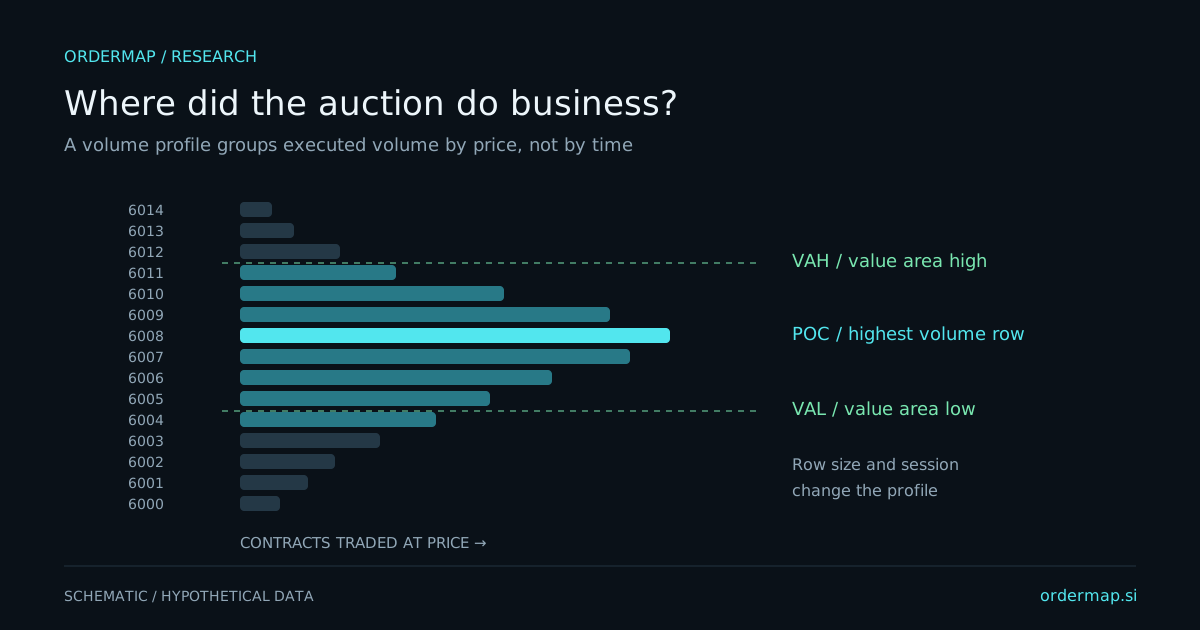
Illustrative distribution only. Changing session boundaries or price-row size can change every highlighted reference.
Record the exact instrument, date, session time zone, measurement window and row size. Then record whether the field is total volume, classified volume, trade count or time. A continuous futures symbol can differ from a dated contract, especially near rollover.
Value-area calculations also need a declared percentage and algorithm. Similar labels do not establish identical tie handling or expansion rules. If two profiles disagree, reduce the comparison to a narrow fixed window and total volume before investigating derived boundaries.
Consider an invented market that builds volume overnight and then trends during the regular session. A full-session profile may emphasize the overnight node while a regular-session profile highlights a newer region. Both can be correct. Choose the one that answers your question rather than searching for the level price later respected.
Preparation should define the window and the hypothesis. Observation should record whether activity develops near or away from the prior distribution. Review should ask whether the window remained appropriate and whether you changed it after seeing the outcome.
A high-volume node records prior activity; it is not an instruction to enter on contact. A low-volume region describes relatively little activity under the selected input. It does not promise rapid traversal on the next visit. Use those references to frame questions about acceptance and response.
OrderMap's futures workspace includes an executed session profile alongside footprint and captured depth. Inspect futures tools and plans if that connected workflow matches your needs. Its profile coverage follows actual captured observations and permissions; a chart setting cannot create missing history.
Choose two candidates and reproduce the same written session definition. Keep the product that makes the source, scope and interpretation clearest, then add complexity only when another research question requires it.
Compare overnight and regular-session volume profiles, define trading dates correctly, and judge whether the cash open accepts or rejects earlier prices.